WikiFree learning path 26 · Beginner
The visual storyhouse
Give every view a reason to exist.
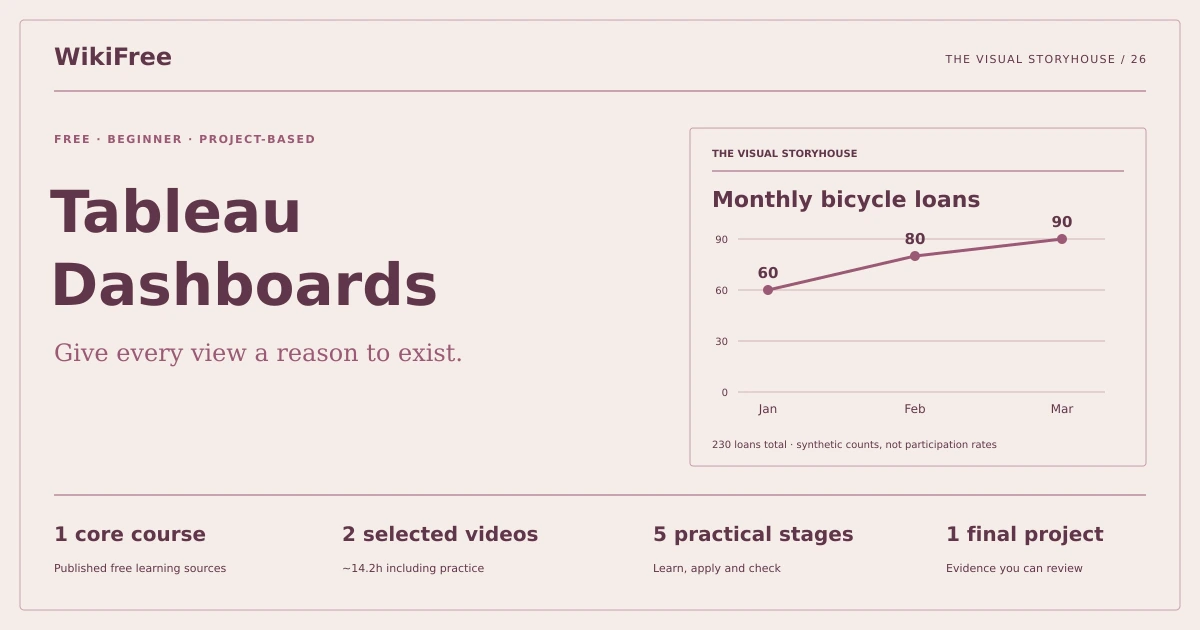
Build a Tableau dashboard that explains monthly bicycle-library usage and survives filtering, total checks and an accessibility review.
Video duration uses the selected lessons only. Reading and practice times are planning estimates; repeat difficult work as needed.
A clear starting point
Who this is for
Comfort with spreadsheet tables and access to Tableau Public or a licensed Tableau installation you already use.
Your practical result
Build a Tableau dashboard that explains monthly bicycle-library usage and survives filtering, total checks and an accessibility review.
This is a focused dashboard project, not the complete six-course Tableau sequence or an advanced calculations credential.
Access and cost
Tableau Public offers a free route for public practice. Use only the supplied synthetic data. An existing licensed Tableau installation is also suitable; no paid subscription is required to study the videos.
The project pack contains an original workbook, case inputs, an evidence log and reference notes. Some technical paths include starter code and a runnable reference. Read the pack README before starting.
Three-minute readiness check
Answer first, then open each explanation. A missed answer identifies what to revisit; it does not stop you from starting.
Should months sort alphabetically?
No. Use a real date or an explicit chronological order.
Can a chart title change the implied population?
Yes. Keep the selected neighborhood and period visible.
Is Tableau Public appropriate for confidential data?
Do not place confidential data in a public practice workflow.
The case you will work on
The fictional Larch Bicycle Library lends bicycles in two neighborhoods. The six monthly counts are synthetic and safe to use in a public practice workbook.
| Month | Neighborhood | Loans |
|---|---|---|
| 2026-01 | North | 40 |
| 2026-01 | South | 20 |
| 2026-02 | North | 30 |
| 2026-02 | South | 50 |
| 2026-03 | North | 50 |
| 2026-03 | South | 40 |
These are supplied synthetic inputs, not observations from a real organization. Label assumptions and any additional data you create.
Keep an evidence trail
Save each stage output in the project folder. In evidence_log.csv, record the decision, the artifact or test that supports it, what failed, and the revision you made.
Your route from learning to evidence
- Stage 1Connect and define the grainA validated source and data table.90 minutes of original practice
- Stage 2Choose the question and viewsA three-view dashboard plan.85 minutes of original practice
- Stage 3Build and reconcile the viewsThree reconciled Tableau worksheets.90 minutes of original practice
- Stage 4Make filtering understandableAn interactive dashboard and filter test sheet.70 minutes of original practice
- Stage 5Review the story and share safelyA dashboard with a text alternative and reproducibility note.60 minutes of original practice
- Final projectMake the evidence reviewableConnect the five stage outputs and test a change.240 minutes estimated
Progress stays in this browser. Tick a stage only after its evidence check passes. This is a personal checklist, not a certificate.
Why these source courses
The path uses selected material from courses already published on WikiFree. The original exercises below connect that material to one practical outcome. Follow only the listed assignments; completing the full source courses is optional.
Learn Skills Daily
Tableau Data Visualization: Free Course
The first two public Tableau lessons establish the interface and dashboard skills. Later provider lessons remain optional; the bicycle-library case is original.
Access: Free Video
Certificate: Free video viewing; certificate not included
Learn it, apply it, check it
Work in order. Every stage produces something the next stage uses. Revisit the repair instruction when a check fails.
Connect and define the grain
Comfort with spreadsheet tables and access to Tableau Public or a licensed Tableau installation you already use.
The idea to use
One row represents one neighborhood-month, not one individual loan. Set month as a date and loans as a number. A six-row source can produce 230 loans without containing 230 records. That distinction controls aggregation and chart labeling. Keep a plain CSV source and check that both neighborhoods have all three months before designing the dashboard.
Watch the selected lessons
Selected video time: 1h 57m. Open this course on WikiFree.
Your 90-minute lab
Connect the CSV, verify date order and build a text table with neighborhood, month and loans.
Save: A validated source and data table..
Evidence check
Six records represent 230 loans across three months and two neighborhoods.
If it fails: Do not use Number of Records as the loan-volume measure.
Choose the question and views
Bring your previous output: A validated source and data table.
The idea to use
Use a line or column view for change over ordered months and a bar view for neighborhood totals. Each view should answer a named question. A chart comparing total loans is not a per-resident participation rate because population is absent. Do not invent denominators to make neighborhoods look comparable.
Watch the selected lessons
Selected video time: 1h 42m. Open this course on WikiFree.
Your 85-minute lab
Sketch a trend view, a neighborhood comparison and a detail table. Explain the question each answers.
Save: A three-view dashboard plan..
Evidence check
The plan uses loan counts and discloses that neighborhood populations are unknown.
If it fails: Replace a population-rate title with a count title unless population data is added.
Build and reconcile the views
Bring your previous output: A three-view dashboard plan.
The idea to use
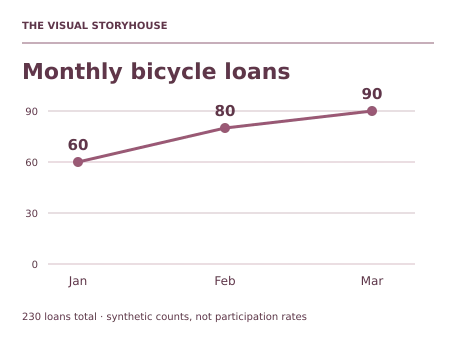
Reconcile each visual to a text table. North totals 120 and South 110; month totals are 60, 80 and 90. Avoid truncated bar axes that exaggerate small differences. Labels and tooltips should reveal exact values, units and the relevant month. These checks turn a persuasive picture into a traceable report.
Original practice stage. No additional video or reading assignment is required.
Your 90-minute lab
Create the planned views and a grand-total check. Label axes, period and aggregation explicitly.
Save: Three reconciled Tableau worksheets..
Evidence check
Every view reconciles to 230 and months appear January through March.
If it fails: If a chart shows six loans, inspect the chosen aggregation rather than styling the axis.
Make filtering understandable
Bring your previous output: Three reconciled Tableau worksheets.
The idea to use
A dashboard filter changes the question being answered. Apply the neighborhood selection consistently to related views and make the active state visible. A reset option helps reviewers return to the baseline. Test one neighborhood, all neighborhoods and a narrow date range; no interaction should leave a headline that describes a broader population than its data.
Original practice stage. No additional video or reading assignment is required.
Your 70-minute lab
Assemble the dashboard and test North-only, February-only and the reset state. Record expected totals before clicking.
Save: An interactive dashboard and filter test sheet..
Evidence check
North-only is 120, February-only is 80 and reset is 230.
If it fails: If a headline remains 230 after filtering, align its scope or clearly label it as an unfiltered benchmark.
Review the story and share safely
Bring your previous output: An interactive dashboard and filter test sheet.
The idea to use
Use readable contrast, direct labels and more than color to identify series. Write a short description that a person can understand without hovering. Tableau Public is intended for public work; only these synthetic rows belong in the exercise. Save a copy and document the tool version and source so the portfolio result can be reproduced.
Original practice stage. No additional video or reading assignment is required.
Your 60-minute lab
Add an accessible text summary and a handover note. Review the smallest intended dashboard layout and remove clipped labels.
Save: A dashboard with a text alternative and reproducibility note..
Evidence check
The text states the 230 total and the 60-to-90 monthly change without claiming a causal explanation.
If it fails: Do not infer why usage increased from a table that contains no causal variables.
A worked reference to compare
Loans increase from 60 in January to 90 in March, a 50% increase in this synthetic period. North contributes 120 and South 110 overall. These are counts, not neighborhood participation rates or proof that an intervention worked.
Compare your reasoning as well as the result. If your answer differs, state the assumption or input that explains the difference. Reference notes are for checking after an attempt; copying them is not evidence of independent work.
Your final project
Your brief
Deliver the workbook or verified public practice link, source CSV, three filter checks, text summary and a design rationale. Add April counts of North 45 and South 35 and verify the new total of 310.
Time box: 4h 00m estimated. Extend it if a gate needs repair.
Hand in these artifacts
- A validated source and data table.
- A three-view dashboard plan.
- Three reconciled Tableau worksheets.
- An interactive dashboard and filter test sheet.
- A dashboard with a text alternative and reproducibility note.
- A short README: outcome, how to inspect or run the work, assumptions and limitations.
- A before-and-after change test and the completed evidence log.
Run a final review
- Use the supplied reference to reconcile the baseline result.
- Choose one relevant input or constraint to change. Write your expected effect before testing it.
- Run the calculation, walkthrough or test again and save the actual result.
- Ask a peer to inspect the evidence, or perform a separate self-review. Label which review you used.
- Score the work using the rubric and repair every critical failure.
Review rubric · 100 points
| Criterion | Points | Evidence to inspect |
|---|---|---|
| Practical outcome and case reasoning | 25 | Build a Tableau dashboard that explains monthly bicycle-library usage and survives filtering, total checks and an accessibility review. |
| Five stage checks | 30 | Award 6 points for each stage only when its stated gate is demonstrably met. |
| Traceable evidence | 20 | Artifacts, inputs and calculations or tests are reproducible; synthetic and simulated evidence is labelled. |
| Revision after a changed condition | 15 | Change one input or constraint, predict the effect, test it and record the result. |
| Handoff quality | 10 | A reviewer can find the files, follow the instructions and understand the remaining limitations. |
Completion target: at least 80/100, all five stage gates passed, and every critical issue below corrected. This is a learning benchmark, not an accredited qualification.
Critical issue: Dashboard totals and filter states reconcile and no private data enters a public workbook.
Before you go further
What will I be able to produce?
Build a Tableau dashboard that explains monthly bicycle-library usage and survives filtering, total checks and an accessibility review.
Is the whole path free?
Tableau Public offers a free route for public practice. Use only the supplied synthetic data. An existing licensed Tableau installation is also suitable; no paid subscription is required to study the videos.
Do I need to finish every source course?
No. Follow the selected assignments at each stage. Source courses provide context, while the original case, labs and final review build the practical result. Extra study is optional.
What counts as completion?
Complete all five stage checks, earn at least 80/100 on the final rubric and correct every critical issue. This is a focused dashboard project, not the complete six-course Tableau sequence or an advanced calculations credential.
Questions & discussion
Share a useful question or correction. Comments appear after moderation. Please avoid personal or sensitive information.