WikiFree learning path 34 · Beginner
The branch garden
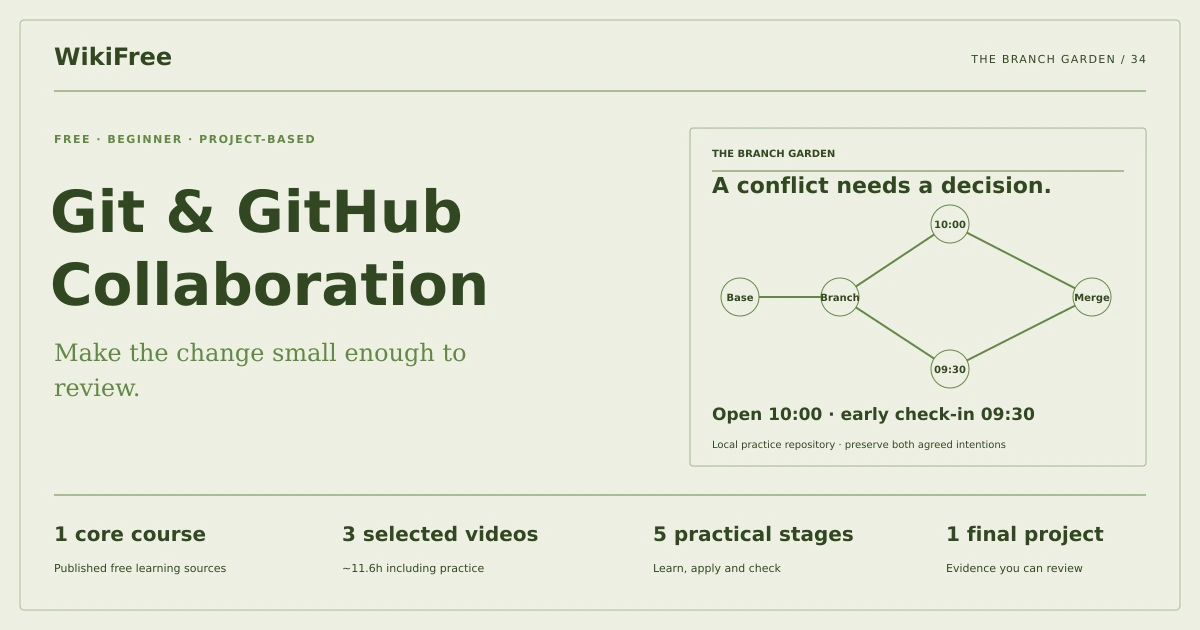
Make the change small enough to review.
Create a local Git collaboration exercise with focused commits, a feature branch, a resolved conflict and a clear review handover.
Video duration uses the selected lessons only. Reading and practice times are planning estimates; repeat difficult work as needed.
A clear starting point
Who this is for
Basic files and command-line navigation. Git installed from its official source; GitHub account optional.
Your practical result
Create a local Git collaboration exercise with focused commits, a feature branch, a resolved conflict and a clear review handover.
This covers a local collaboration workflow. It does not require a public GitHub upload or cover advanced rebasing, release automation or repository administration.
Access and cost
Assigned public videos can be watched free. Complete the original case in a text editor, on paper or in a spreadsheet you already have. No paid course, exam or provider certificate is included.
The project pack contains an original workbook, case inputs, an evidence log and reference notes. Some technical paths include starter code and a runnable reference. Read the pack README before starting.
Three-minute readiness check
Answer first, then open each explanation. A missed answer identifies what to revisit; it does not stop you from starting.
Does git add create a commit?
No. It stages selected content.
Should a conflict be solved by deleting markers only?
No. Resolve the intended combined meaning and verify it.
Is GitHub required for local branching?
No.
The case you will work on
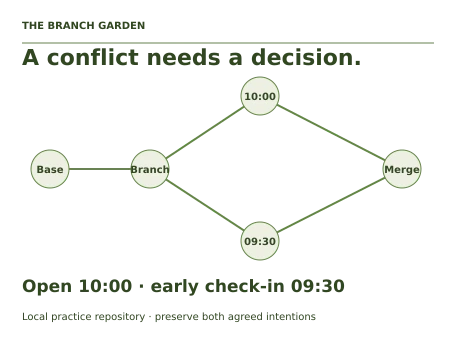
The fictional Cedar Handbook repository contains a README and a workshop schedule. Two branches change the same opening-time line from a shared base, creating a deliberate practice conflict. All work happens in a new disposable practice folder.
| Version | Opening-time line |
|---|---|
| Base | Opens at 09:00 |
| Main change | Opens at 10:00 |
| Feature change | Opens at 09:30 |
| Agreed resolution | Opens at 10:00; early check-in at 09:30 |
These are supplied synthetic inputs, not observations from a real organization. Label assumptions and any additional data you create.
Keep an evidence trail
Save each stage output in the project folder. In evidence_log.csv, record the decision, the artifact or test that supports it, what failed, and the revision you made.
Your route from learning to evidence
- Stage 1Create a clean repositoryA clean repository with a baseline commit.80 minutes of original practice
- Stage 2Develop a focused branchA focused feature branch and change explanation.75 minutes of original practice
- Stage 3Produce and resolve the conflictA merged history with a documented resolution.90 minutes of original practice
- Stage 4Correct a mistake safelyA traceable correction and recovery note.65 minutes of original practice
- Stage 5Prepare a review handoverA review-ready local repository and handover note.55 minutes of original practice
- Final projectMake the evidence reviewableConnect the five stage outputs and test a change.210 minutes estimated
Progress stays in this browser. Tick a stage only after its evidence check passes. This is a personal checklist, not a certificate.
Why these source courses
The path uses selected material from courses already published on WikiFree. The original exercises below connect that material to one practical outcome. Follow only the listed assignments; completing the full source courses is optional.
Free Git and GitHub Course by Google
Google introductory, beginner and collaboration lessons support the local workflow. The compilation video is excluded to avoid repeating the assigned material.
Access: Free Video
Certificate: Free video viewing; a Google certificate is not included
Learn it, apply it, check it
Work in order. Every stage produces something the next stage uses. Revisit the repair instruction when a check fails.
Create a clean repository
Basic files and command-line navigation. Git installed from its official source; GitHub account optional.
The idea to use
Git tracks snapshots of selected files. The working tree, staging area and committed history are different states. Start a new practice folder, initialize it and create a README and schedule file. Inspect status and diff before committing so the first snapshot contains only intended content. Never place credentials or unrelated personal files in the exercise.
Watch the selected lessons
Selected video time: 1h 04m. Open this course on WikiFree.
Your 80-minute lab
Initialize the supplied two-file project and make a descriptive baseline commit. Save status and log output.
Save: A clean repository with a baseline commit..
Evidence check
The baseline contains only the README and schedule, and status is clean afterward.
If it fails: If unrelated files appear, stop and create the repository in the intended new folder.
Develop a focused branch
Bring your previous output: A clean repository with a baseline commit.
The idea to use
A branch names a line of work so a change can be reviewed before integration. Keep one logical purpose per commit and explain why the change is needed. A diff is the reviewable artifact; a commit message alone does not prove what changed. In this local exercise, no push or external repository is required.
Watch the selected lessons
Selected video time: 56m. Open this course on WikiFree.
Your 75-minute lab
Create a feature branch, change the schedule line and commit it. Review the diff against the baseline.
Save: A focused feature branch and change explanation..
Evidence check
The diff contains the intended schedule change and no unrelated edits.
If it fails: Split formatting noise from the functional change so review remains understandable.
Produce and resolve the conflict
Bring your previous output: A focused feature branch and change explanation.
The idea to use
A conflict means Git cannot choose between overlapping edits automatically. Inspect both branch intentions and the agreed requirement. Replace the conflict region with the correct combined line, then verify the complete file and stage the resolution. Choosing one side blindly can discard a valid requirement even when the merge command eventually succeeds.
Original practice stage. No additional video or reading assignment is required.
Your 90-minute lab
Create the conflicting main-branch change using the walkthrough, merge the feature branch and resolve to the agreed line.
Save: A merged history with a documented resolution..
Evidence check
The final line includes 10:00 opening and 09:30 early check-in, with no conflict markers.
If it fails: Read the surrounding file after resolution; do not assume removing markers preserves both intentions.
Correct a mistake safely
Bring your previous output: A merged history with a documented resolution.
The idea to use
Inspect status and diff before undoing anything. A new revert commit can reverse a committed change while retaining history; restoring an uncommitted file discards its local edits and is a different operation. In the practice repository, demonstrate a deliberate mistake and a traceable correction. Avoid rewriting shared history as a beginner recovery technique.
Original practice stage. No additional video or reading assignment is required.
Your 65-minute lab
Make a separate typo commit, then correct it with a new commit or a documented revert. Explain the difference from discarding uncommitted work.
Save: A traceable correction and recovery note..
Evidence check
The final content is correct and the history shows what was corrected.
If it fails: Do not use a destructive reset to hide the mistake in this collaboration exercise.
Prepare a review handover
Bring your previous output: A traceable correction and recovery note.
The idea to use
A review request should explain the problem, resulting behavior and verification evidence. Include the branch comparison, conflict decision and any remaining limits. A GitHub pull request is an optional hosting workflow for the same review principles. The assessed outcome is a local repository another learner can inspect without access to a private account.
Original practice stage. No additional video or reading assignment is required.
Your 55-minute lab
Write a pull-request-style description and export a log plus final file diff. Optionally use your own GitHub repository later.
Save: A review-ready local repository and handover note..
Evidence check
A reviewer can identify the intended change, final schedule and conflict resolution from the supplied evidence.
If it fails: Replace vague works fine claims with the exact content and checks performed.
A worked reference to compare
The merged schedule preserves both agreed intentions: opening at 10:00 and early check-in at 09:30. A successful merge is meaningful only after checking that final behavior, not merely the absence of Git error output.
Compare your reasoning as well as the result. If your answer differs, state the assumption or input that explains the difference. Reference notes are for checking after an attempt; copying them is not evidence of independent work.
Your final project
Your brief
Deliver the local repository or Git bundle, a concise commit log, conflict explanation and review description. Demonstrate a clean working tree and explain how a reviewer recreates the exercise from the supplied walkthrough.
Time box: 3h 30m estimated. Extend it if a gate needs repair.
Hand in these artifacts
- A clean repository with a baseline commit.
- A focused feature branch and change explanation.
- A merged history with a documented resolution.
- A traceable correction and recovery note.
- A review-ready local repository and handover note.
- A short README: outcome, how to inspect or run the work, assumptions and limitations.
- A before-and-after change test and the completed evidence log.
Run a final review
- Use the supplied reference to reconcile the baseline result.
- Choose one relevant input or constraint to change. Write your expected effect before testing it.
- Run the calculation, walkthrough or test again and save the actual result.
- Ask a peer to inspect the evidence, or perform a separate self-review. Label which review you used.
- Score the work using the rubric and repair every critical failure.
Review rubric · 100 points
| Criterion | Points | Evidence to inspect |
|---|---|---|
| Practical outcome and case reasoning | 25 | Create a local Git collaboration exercise with focused commits, a feature branch, a resolved conflict and a clear review handover. |
| Five stage checks | 30 | Award 6 points for each stage only when its stated gate is demonstrably met. |
| Traceable evidence | 20 | Artifacts, inputs and calculations or tests are reproducible; synthetic and simulated evidence is labelled. |
| Revision after a changed condition | 15 | Change one input or constraint, predict the effect, test it and record the result. |
| Handoff quality | 10 | A reviewer can find the files, follow the instructions and understand the remaining limitations. |
Completion target: at least 80/100, all five stage gates passed, and every critical issue below corrected. This is a learning benchmark, not an accredited qualification.
Critical issue: The agreed final content is present, no conflict markers remain and no unrelated or secret files are committed.
Before you go further
What will I be able to produce?
Create a local Git collaboration exercise with focused commits, a feature branch, a resolved conflict and a clear review handover.
Is the whole path free?
Assigned public videos can be watched free. Complete the original case in a text editor, on paper or in a spreadsheet you already have. No paid course, exam or provider certificate is included.
Do I need to finish every source course?
No. Follow the selected assignments at each stage. Source courses provide context, while the original case, labs and final review build the practical result. Extra study is optional.
What counts as completion?
Complete all five stage checks, earn at least 80/100 on the final rubric and correct every critical issue. This covers a local collaboration workflow. It does not require a public GitHub upload or cover advanced rebasing, release automation or repository administration.
Questions & discussion
Share a useful question or correction. Comments appear after moderation. Please avoid personal or sensitive information.