WikiFree learning paths / 08 · The defense map
The defense map
Know what matters. Protect it. Practice recovery.
Map a small fictional environment, prioritize its risks and produce a practical protection and incident-response plan.
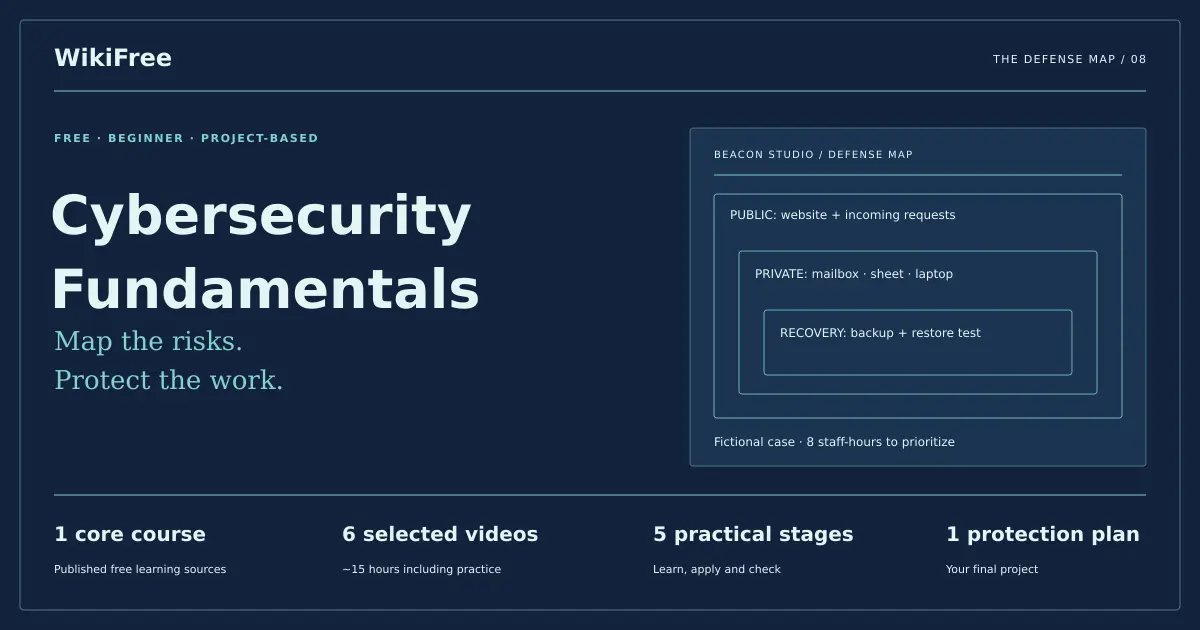
Beacon Studio / defense map
Protect the work.
Website and incoming requests
Mailbox · booking sheet · laptop
Backup + an actual restore check
- Beginner
- starting level
- 1
- core course
- ≈16h
- learning + practice estimate
- 5 + 1
- stages + final project
The practical outcome
What you will be able to show
Map a small fictional environment, prioritize its risks and produce a practical protection and incident-response plan.
For: Beginners responsible for their own accounts or preparing for further security study.
Before you begin: A document editor and basic familiarity with files, accounts and the internet. Exercises use a fictional environment; no scanning tools, attack lab or paid security service is required.
Original pathway and exercises by WikiFree Editorial. Course pages and official source metadata reviewed on 12 October 2026. Version 1.0.
A ten-minute starting check
Try these before opening a lesson
Answer in your own words, then reveal the guidance. If you can already demonstrate a stage’s completion gate with evidence, skim its lesson assignment and move to the next stage.
Name a difference between a threat and a vulnerability.
A threat is a potential cause of harm; a vulnerability is a weakness it could exploit.
Is a successful backup job enough to prove recovery works?
No. A restore must be checked against the intended files and recovery needs.
Does MFA eliminate every way an account can be compromised?
No. It reduces important risks but still needs recovery planning, careful use and other controls.
Sequence with a purpose
Build one layer at a time
- 01Map assets and dependenciesAn asset register and dependency sketch.
- 02Prioritize plausible risksA prioritized risk register with owners and effort estimates.
- 03Protect access and recovery routesAn access matrix and account-protection checklist.
- 04Reduce exposure and check backupsA protection checklist and restore-test procedure.
- 05Rehearse an incident responseAn incident log, communication draft and improvement list.
Finish with the capstone. Progress means a reviewable output, not simply a watched video.
A deliberately short course list
Use these courses for these reasons
Free Cybersecurity Course for Beginners by Google
Google · Beginner · English
Selected beginner lessons provide security concepts, risk, access, network protection and incident handling without requiring the full Linux, SQL and Python sequence.
Assigned viewing: 3h 31m 20s. The full source course contains additional material.
Open the WikiFree course and official learning route ↗Free Cybersecurity Architecture Course: Identity to Response
IBM · Intermediate · English
Optional next step after the capstone: IBM’s architecture course connects identity, endpoints, data, detection and response. It is cataloged Intermediate and is not included in the core time.
Outside the core estimate. 3h 2m video · self-paced.
Open the WikiFree course and official learning route ↗Free learning, clearly defined
The selected videos are free to view and do not include Google or IBM certification. All core exercises use fictional assets and a paper tabletop. Optional real-account changes should follow the account provider’s current instructions and your organization’s authorization.
Skills and evidence
| Stage / skill | Learning support | Evidence to produce |
|---|---|---|
| 01 · Map assets and dependencies | Google selected lessons | An asset register and dependency sketch. |
| 02 · Prioritize plausible risks | Google selected lessons | A prioritized risk register with owners and effort estimates. |
| 03 · Protect access and recovery routes | Google selected lessons | An access matrix and account-protection checklist. |
| 04 · Reduce exposure and check backups | Google selected lessons | A protection checklist and restore-test procedure. |
| 05 · Rehearse an incident response | Google selected lessons | An incident log, communication draft and improvement list. |
Stage 1 / The defense map
Map assets and dependencies
You will: Explain what must be protected and why.
Assigned learning
Free Cybersecurity Course for Beginners by Google
- Lesson 1 · Cybersecurity for Beginners
Use the names if the provider later changes the order. Only these assignments enter the core estimate.
Start with the work the organization needs to do: receive requests, maintain bookings and recover after disruption. For each asset, record its owner, the information it holds, who can access it and what would happen if it were unavailable or wrong.
Confidentiality, integrity and availability are different needs. A public website may have little confidential content yet still need strong protection against unauthorized changes. A backup that depends on the same compromised account may not provide independent recovery.
Make something reviewable
Create a five-asset inventory and draw the dependencies. Identify the mailbox as a recovery dependency where appropriate, then state which access details are unknown rather than guessing.
Deliver: An asset register and dependency sketch.
Completion gate
Every asset has an owner and a consequence; unknown information is explicitly marked.
If you get stuck: If the inventory is only a list of devices, add accounts, data and recovery dependencies. If everything is “critical,” describe the specific effect of losing each asset.
Stage 2 / The defense map
Prioritize plausible risks
You will: Connect weaknesses, consequences and actions.
Assigned learning
Free Cybersecurity Course for Beginners by Google
- Lesson 2 · How To Manage Security Risks & Threats
Use the names if the provider later changes the order. Only these assignments enter the core estimate.
Write a risk scenario as cause, event and impact: a reused or stolen mailbox password could allow unauthorized access and disrupt bookings. Use a simple 1–3 likelihood and impact scale to organize discussion, not as a measured probability or expected loss calculation.
Record why you assigned each rating and what evidence could change it. Similar scores may still require different action because one weakness affects recovery for several assets.
Make something reviewable
Create five risk scenarios from the case. Choose three first actions that fit eight staff-hours, state their dependencies and explain one action you defer.
Deliver: A prioritized risk register with owners and effort estimates.
Completion gate
Every priority traces to a specific asset and consequence; total planned effort does not exceed eight hours.
If you get stuck: If the list contains products instead of risks, rewrite it around the failure you are trying to prevent. If ratings look precise but have no rationale, use plain ordinal judgments.
Stage 3 / The defense map
Protect access and recovery routes
You will: Plan account access that can be managed and recovered.
Assigned learning
Free Cybersecurity Course for Beginners by Google
- Lesson 32 · How To Authorize Users as a Cybersecurity Analyst
Use the names if the provider later changes the order. Only these assignments enter the core estimate.
Give people the access needed for their role and review access when roles change. Shared credentials make accountability and removal harder. Plan individual access where the service supports it, protect privileged accounts first and document a safe recovery route.
CISA recommends strong unique passwords, a password manager, MFA and current software. Prefer phishing-resistant MFA when the service supports it; do not describe any method as an absolute guarantee. Recovery codes and recovery contacts also need protection.
Make something reviewable
Write an access matrix for the three fictional roles. Add an MFA rollout checklist with a recovery check and a removal-of-access checklist. Do not put real passwords or codes in the workbook.
Deliver: An access matrix and account-protection checklist.
Completion gate
Access has an owner, privileged access is limited, and a recovery check is scheduled before relying on a new setup.
If you get stuck: If the plan stores shared passwords in a plain document, replace that with an approved credential-management approach. If removal depends on memory, give it an owner and trigger.
Stage 4 / The defense map
Reduce exposure and check backups
You will: Pair prevention with verifiable recovery.
Assigned learning
Free Cybersecurity Course for Beginners by Google
- Lesson 15 · What are Network Tools and Protocols in Cybersecurity?
- Lesson 17 · How To Secure Networks in Cybersecurity
Use the names if the provider later changes the order. Only these assignments enter the core estimate.
Describe the boundary between the public website, staff devices and private booking data. Keep the plan understandable: update supported software, review unnecessary exposure and restrict administrative access. A diagram should help an owner decide what to protect, not display every networking term you know.
For backups, specify what is copied, where it is kept, who can restore it and how success will be checked. A tabletop can rehearse the decision process, but it cannot prove that a real backup can be restored.
Make something reviewable
Draw a simple public/private boundary and create a restore-test plan for a fictional booking file. Define the expected contents, acceptable recovery age and the record you will keep after an actual authorized test.
Deliver: A protection checklist and restore-test procedure.
Completion gate
The procedure names a test file, expected result, responsible person and a way to detect a failed restore.
If you get stuck: If the only evidence is “backup completed,” add an independent restore check. If the backup shares every access dependency with the original, record the remaining risk.
Stage 5 / The defense map
Rehearse an incident response
You will: Communicate and make careful first decisions.
Assigned learning
Free Cybersecurity Course for Beginners by Google
- Lesson 26 · How Cybersecurity Teams Manage Incidents
Use the names if the provider later changes the order. Only these assignments enter the core estimate.
Use the case timeline: at 09:00 a suspicious message is reported; at 09:10 an unexpected login alert appears; at 09:20 a booking change is disputed. These observations do not yet prove the full scope of an incident. Record facts, times and sources separately from hypotheses.
Assign who coordinates, who contacts the service provider and who communicates with affected colleagues. Preserve relevant records, follow the approved response procedure and avoid destructive cleanup that could erase evidence before qualified help reviews it.
Make something reviewable
Run a 20-minute tabletop. Log each decision, owner and next check. Draft a factual internal update with what is known, unknown and being done. Finish with two improvements to the plan.
Deliver: An incident log, communication draft and improvement list.
Completion gate
The team can identify the coordinator and next action; the update does not present an unconfirmed hypothesis as a fact.
If you get stuck: If everyone acts at once, appoint a coordinator and a decision log. If the exercise jumps directly to wiping a device, stop and revisit evidence preservation and the authorized response process.
Original practice material
Your case pack and reference checks
Download the editable plain-text workbook, or open the full copy below. It contains the case inputs, templates and reference guidance. Try the exercises before reading the answers.
Download the practice workbook ↓ Download project files (ZIP) ↓Open the complete workbook in this page
WIKIFREE / THE DEFENSE MAP
Fictional defensive planning exercise. Version 1.0 — 12 October 2026.

ASSETS
Booking mailbox — coordinator owns it; shared password; MFA absent.
Public website — site owner; public content; admin access details unknown.
Booking spreadsheet — operations owner; contains fictional booking records.
Main laptop — operations owner; supported system; one update overdue.
Backup drive — operations owner; copy schedule described, restore never tested.
Three roles: coordinator, editor, operations. Do not invent their real permissions.

REGISTER
Asset | Owner | Data | Access | Dependency | Loss/change impact | Unknowns
Risk | Weakness | Plausible event | Consequence | Likelihood 1–3 | Impact 1–3
Rationale | Proposed action | Owner | Estimated effort | Verification | Residual risk
The scales are ordinal editorial aids, not measured probabilities.

EIGHT-HOUR EXAMPLE, NOT A PRESCRIPTION FOR REAL SYSTEMS
Mailbox access/MFA/recovery planning and authorized setup: 2h.
Laptop update and basic verification: 1h.
Backup restore procedure and an authorized isolated test: 2h.
Access inventory and removal checklist: 1h.
Tabletop and improvement notes: 2h. Total 8h.
Website admin access remains an explicit investigation item; do not mark it secure.
For the paper-only version, all setup/test steps remain Proposed, not Completed.

RESTORE-TEST TEMPLATE
Test file and expected contents:
Backup date and acceptable age:
Authorized operator / isolated destination:
Restore steps from the provider's current instructions:
Compare file contents or a known checksum, record discrepancies:
Actual result / time / next action:
A tabletop cannot establish that an actual backup restored successfully.

INCIDENT INJECTS
09:00 — a suspicious message is reported. No click is confirmed.
09:10 — a login alert arrives. Its authenticity and user are not yet established.
09:20 — a booking change is disputed. The cause is unknown.
For each: record fact, source, hypothesis, decision, owner, time and next check.
Draft update: “We received a reported suspicious message and are checking an
unexpected login alert and a booking change. [Owner] is coordinating verification.
Please preserve related records and use the approved reporting route. Next update:
[time].” Fill owner/time for the case; do not send it to real people.

DEBRIEF
What slowed coordination? What evidence was missing? Which control would have
helped? Name two changes with owners. No real credentials or unauthorized scans.
Case data, exercises and reference examples: WikiFree Editorial, original training material. Provider lessons are linked, not reproduced.
Final project / 3h practice estimate
Beacon Studio’s first defense plan
Produce a bounded first-cycle protection plan and demonstrate its use in a tabletop. Distinguish documented proposals, simulated actions and any genuinely completed checks.
Your handover package
- Five-asset inventory with dependencies and owners
- Risk register with an eight-hour first-cycle plan
- Access, update and restore-test checklists
- Tabletop timeline, factual update and two improvement actions
| Criterion | Points | Evidence expected |
|---|---|---|
| Asset and risk reasoning | 30 | Priorities follow from the environment and documented assumptions. |
| Practical protection | 25 | Owners, access controls and actions are feasible within the time budget. |
| Recovery and response | 30 | Restore success is testable and incident decisions preserve evidence. |
| Clarity and scope | 15 | Proposed, simulated and completed actions are distinguished. |
Completion standard: aim for at least 80/100, with all critical gates met. A reviewer awards each row’s points in proportion to the evidence shown. This is a learning rubric, not a provider credential.
Unapproved live testing, exposed credentials or a claim that a simulated restore proves real recovery must be corrected.
A pace that leaves room to practice
Plan the next few weeks
Assigned viewing: 3h 31m 20s. Practice and capstone: 11.5 hours, editorial estimate. Budget about 16 hours overall. Replays and personal adaptations can take longer.
| Available time | Flexible estimate | How to use it |
|---|---|---|
| 2 hours/week | 8 weeks | Reserve time to make the output and pass its gate; split a long lesson across sessions. |
| 5 hours/week | 4 weeks | Reserve time to make the output and pass its gate; split a long lesson across sessions. |
| 10 hours/week | 2 weeks | Reserve time to make the output and pass its gate; split a long lesson across sessions. |
The calculation stays in your browser. The estimates above remain usable without JavaScript.
Checkbox progress is saved only in this browser when local storage is available. It is not sent to WikiFree or synchronized to an account.
Questions before you continue
Will I scan or attack a real system?
No. The core outcome is a defensive plan and tabletop for a fictional environment.
Can the plan guarantee security?
No. It establishes a first set of priorities and checks. Real environments require ongoing maintenance and appropriate specialist review.
Sources and honest boundaries
What was checked, and what comes next
This path develops a first protection plan and tabletop exercise. It does not qualify you to perform penetration testing, investigate an active compromise or certify a real organization’s security.
The complete published WikiFree course catalog was checked on 12 October 2026: 815 courses across nine API pages. Course pages and official playlist metadata or module headings were inspected. This does not mean every video was played to completion, every geographic region was tested, or a provider credential was earned.
- Google · official source for Free Cybersecurity Course for Beginners by Google
- IBM · official source for Free Cybersecurity Architecture Course: Identity to Response
- CISA: Secure Our World
- CISA: Require multifactor authentication
Keep the published course pages as your route into provider material. Access, lesson order and tool interfaces can change. Report a broken route through WikiFree’s correction page.
Questions & discussion
Share a useful question or correction. Comments appear after moderation. Please avoid personal or sensitive information.