WikiFree learning path 50 · Intermediate
The container dock
Package the application, explain what stays outside.
Containerize a tiny local web service, run it with an explicit port mapping and document image, container, configuration and data-lifecycle behavior.
Video duration uses the selected lessons only. Reading and practice times are planning estimates; repeat difficult work as needed.
A clear starting point
Who this is for
Basic terminal commands and the Node.js API path or equivalent simple server knowledge. Access to an appropriate Docker installation.
Your practical result
Containerize a tiny local web service, run it with an explicit port mapping and document image, container, configuration and data-lifecycle behavior.
This is an introductory packaging project, not Kubernetes, swarm administration, production deployment or persistent database design.
Access and cost
Videos are free. Docker Engine provides a local Linux route; Docker Desktop use depends on its current terms and the learner organization. Check official installation and licensing guidance for your environment. No paid hosting is required.
The project pack contains an original workbook, case inputs, an evidence log and reference notes. Some technical paths include starter code and a runnable reference. Read the pack README before starting.
Three-minute readiness check
Answer first, then open each explanation. A missed answer identifies what to revisit; it does not stop you from starting.
Is an image the same as a running container?
No.
Does deleting a container automatically preserve its writable data?
Do not assume it does; use deliberate persistence design when needed.
Should secrets be baked into an image?
No.
The case you will work on
The fictional Juniper Status service returns a fixed JSON health response. It has no database, secrets or external API. The learning container binds a local host port for review; the project does not deploy to the public internet.
| Concept | Practice artifact |
|---|---|
| Image | Built from a Dockerfile |
| Container | A running instance of the image |
| Port mapping | Local host port to application port |
| Configuration | An explicit nonsecret environment value |
| Persistence | No persistent application data in this example |
These are supplied synthetic inputs, not observations from a real organization. Label assumptions and any additional data you create.
Keep an evidence trail
Save each stage output in the project folder. In evidence_log.csv, record the decision, the artifact or test that supports it, what failed, and the revision you made.
Your route from learning to evidence
- Stage 1Explain image and container boundariesA container lifecycle map.55 minutes of original practice
- Stage 2Create a small build contextA small documented image build.90 minutes of original practice
- Stage 3Run and inspect the serviceA running local container and response check.85 minutes of original practice
- Stage 4Separate configuration and lifecycleA configuration and lifecycle demonstration.80 minutes of original practice
- Stage 5Document a reproducible handoverA containerized service package and troubleshooting note.75 minutes of original practice
- Final projectMake the evidence reviewableConnect the five stage outputs and test a change.240 minutes estimated
Progress stays in this browser. Tick a stage only after its evidence check passes. This is a personal checklist, not a certificate.
Why these source courses
The path uses selected material from courses already published on WikiFree. The original exercises below connect that material to one practical outcome. Follow only the listed assignments; completing the full source courses is optional.
Simplilearn
Free Simplilearn Course: Docker Containers, Compose and Deployment
Selected public Docker lessons cover concepts, basic operation, containers, Compose and packaging an application; long overlapping compilation videos are excluded.
Access: Free Video
Certificate: Free video viewing; Simplilearn certificate not included
Learn it, apply it, check it
Work in order. Every stage produces something the next stage uses. Revisit the repair instruction when a check fails.
Explain image and container boundaries
Basic terminal commands and the Node.js API path or equivalent simple server knowledge. Access to an appropriate Docker installation.
The idea to use
An image packages a filesystem and configuration used to create containers. A container is an instance with runtime state. This distinction explains why rebuilding an image and restarting a container are different actions. Our tiny service deliberately avoids persistence so the first experiment focuses on packaging and execution rather than database operations.
Watch the selected lessons
Selected video time: 16m. Open this course on WikiFree.
Your 55-minute lab
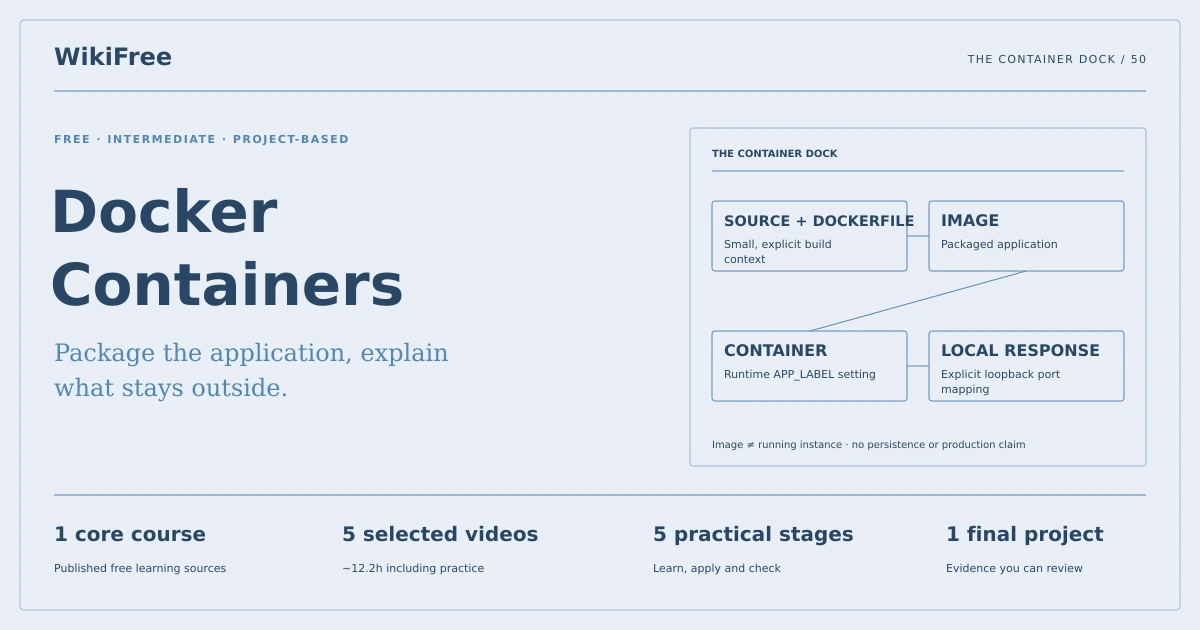
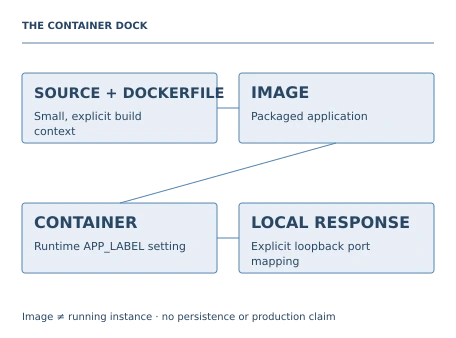
Draw the relationship between source files, Dockerfile, image and running container. Label what changes during a rebuild.
Save: A container lifecycle map..
Evidence check
The map distinguishes immutable image content from a running instance and its writable state.
If it fails: Do not describe a container as a complete independent physical machine.
Create a small build context
Bring your previous output: A container lifecycle map.
The idea to use
The build context is the set of files available to the build. Keep it narrow and exclude unrelated files with a .dockerignore. Use a documented official base image and a nonroot application user where practical. The supplied service uses built-in Node modules, so the image does not need a large dependency install for this exercise.
Watch the selected lessons
Selected video time: 30m. Open this course on WikiFree.
Your 90-minute lab
Review the service, Dockerfile and ignore file. Build an image in the dedicated project folder and record the selected base tag.
Save: A small documented image build..
Evidence check
Only intended source files enter the context and no credentials or personal files are copied.
If it fails: Do not build from a broad home directory just because the command runs there.
Run and inspect the service
Bring your previous output: A small documented image build.
The idea to use
A port mapping connects a host port to the application listening port inside the container. For local practice, bind the host side to loopback. Inspect container status and logs, then request the health endpoint. A running process does not prove the expected response works, so test the user-visible behavior after starting it.
Watch the selected lessons
Selected video time: 21m. Open this course on WikiFree.
Your 85-minute lab
Run the container with the documented local mapping and request its JSON health response. Record status and logs.
Save: A running local container and response check..
Evidence check
The health response matches the contract and the host mapping is limited to localhost.
If it fails: If the endpoint fails, compare application listen address, container port and host mapping before rebuilding.
Separate configuration and lifecycle
Bring your previous output: A running local container and response check.
The idea to use
Runtime configuration can vary without copying a new secret into the image. Use a harmless environment value such as APP_LABEL in this exercise. Stop and recreate the container to observe the difference between image contents and runtime settings. Compose can describe the same local setup declaratively; current command syntax may differ from older video demonstrations.
Watch the selected lessons
Selected video time: 18m. Open this course on WikiFree.
Your 80-minute lab
Run two instances sequentially with different APP_LABEL values, then express the setup in the supplied Compose file.
Save: A configuration and lifecycle demonstration..
Evidence check
The label changes at runtime without editing source, and no claim of durable data storage is made.
If it fails: Do not treat a container writable layer as a backup strategy.
Document a reproducible handover
Bring your previous output: A configuration and lifecycle demonstration.
The idea to use
A handover needs the source, Dockerfile, runtime command, tested image tag and observed response. Record the actual engine and Compose versions if used. Clean up only the named practice container and image when finished, preserving unrelated work. Production use would need additional security, update, monitoring and persistence decisions beyond this local demonstration.
Watch the selected lessons
Selected video time: 21m. Open this course on WikiFree.
Your 75-minute lab
Write the README, rerun from the project files and document a missing-port-mapping failure and its correction.
Save: A containerized service package and troubleshooting note..
Evidence check
A reviewer can rebuild and run the service using the documented commands and understand the limits.
If it fails: Do not claim production readiness or cross-platform testing from one successful local run.
A worked reference to compare
The image contains the service code; APP_LABEL is supplied at run time. The application listens inside the container, while an explicit loopback port mapping exposes it only for local review. A successful health response verifies more than container status alone.
Compare your reasoning as well as the result. If your answer differs, state the assumption or input that explains the difference. Reference notes are for checking after an attempt; copying them is not evidence of independent work.
Your final project
Your brief
Deliver the service, Dockerfile, ignore file, Compose file, README and observed run evidence. Rebuild after a harmless response change and explain why an existing container does not automatically adopt the new image.
Time box: 4h 00m estimated. Extend it if a gate needs repair.
Hand in these artifacts
- A container lifecycle map.
- A small documented image build.
- A running local container and response check.
- A configuration and lifecycle demonstration.
- A containerized service package and troubleshooting note.
- A short README: outcome, how to inspect or run the work, assumptions and limitations.
- A before-and-after change test and the completed evidence log.
Run a final review
- Use the supplied reference to reconcile the baseline result.
- Choose one relevant input or constraint to change. Write your expected effect before testing it.
- Run the calculation, walkthrough or test again and save the actual result.
- Ask a peer to inspect the evidence, or perform a separate self-review. Label which review you used.
- Score the work using the rubric and repair every critical failure.
Review rubric · 100 points
| Criterion | Points | Evidence to inspect |
|---|---|---|
| Practical outcome and case reasoning | 25 | Containerize a tiny local web service, run it with an explicit port mapping and document image, container, configuration and data-lifecycle behavior. |
| Five stage checks | 30 | Award 6 points for each stage only when its stated gate is demonstrably met. |
| Traceable evidence | 20 | Artifacts, inputs and calculations or tests are reproducible; synthetic and simulated evidence is labelled. |
| Revision after a changed condition | 15 | Change one input or constraint, predict the effect, test it and record the result. |
| Handoff quality | 10 | A reviewer can find the files, follow the instructions and understand the remaining limitations. |
Completion target: at least 80/100, all five stage gates passed, and every critical issue below corrected. This is a learning benchmark, not an accredited qualification.
Critical issue: The build context excludes unrelated files and secrets, and the demonstrated service remains a clearly scoped local exercise.
Before you go further
What will I be able to produce?
Containerize a tiny local web service, run it with an explicit port mapping and document image, container, configuration and data-lifecycle behavior.
Is the whole path free?
Videos are free. Docker Engine provides a local Linux route; Docker Desktop use depends on its current terms and the learner organization. Check official installation and licensing guidance for your environment. No paid hosting is required.
Do I need to finish every source course?
No. Follow the selected assignments at each stage. Source courses provide context, while the original case, labs and final review build the practical result. Extra study is optional.
What counts as completion?
Complete all five stage checks, earn at least 80/100 on the final rubric and correct every critical issue. This is an introductory packaging project, not Kubernetes, swarm administration, production deployment or persistent database design.
Questions & discussion
Share a useful question or correction. Comments appear after moderation. Please avoid personal or sensitive information.